• Home
  • Products
  • Configurations
  • Features
  • Contact
  • About
  • NCI Blog
Menu

NCI Vision Systems

16W241 S. Frontage Road, Suite 44
Burr Ridge, IL, 60527
(815) 312-2020
Quality Vision Testing, USAF Approved Cone Contrast Test

Your Custom Text Here

NCI Vision Systems

  • Home
  • Products
  • Configurations
  • Features
  • Contact
  • About
  • NCI Blog

Configurations

Configurations:

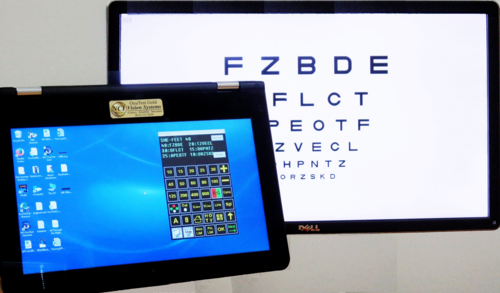
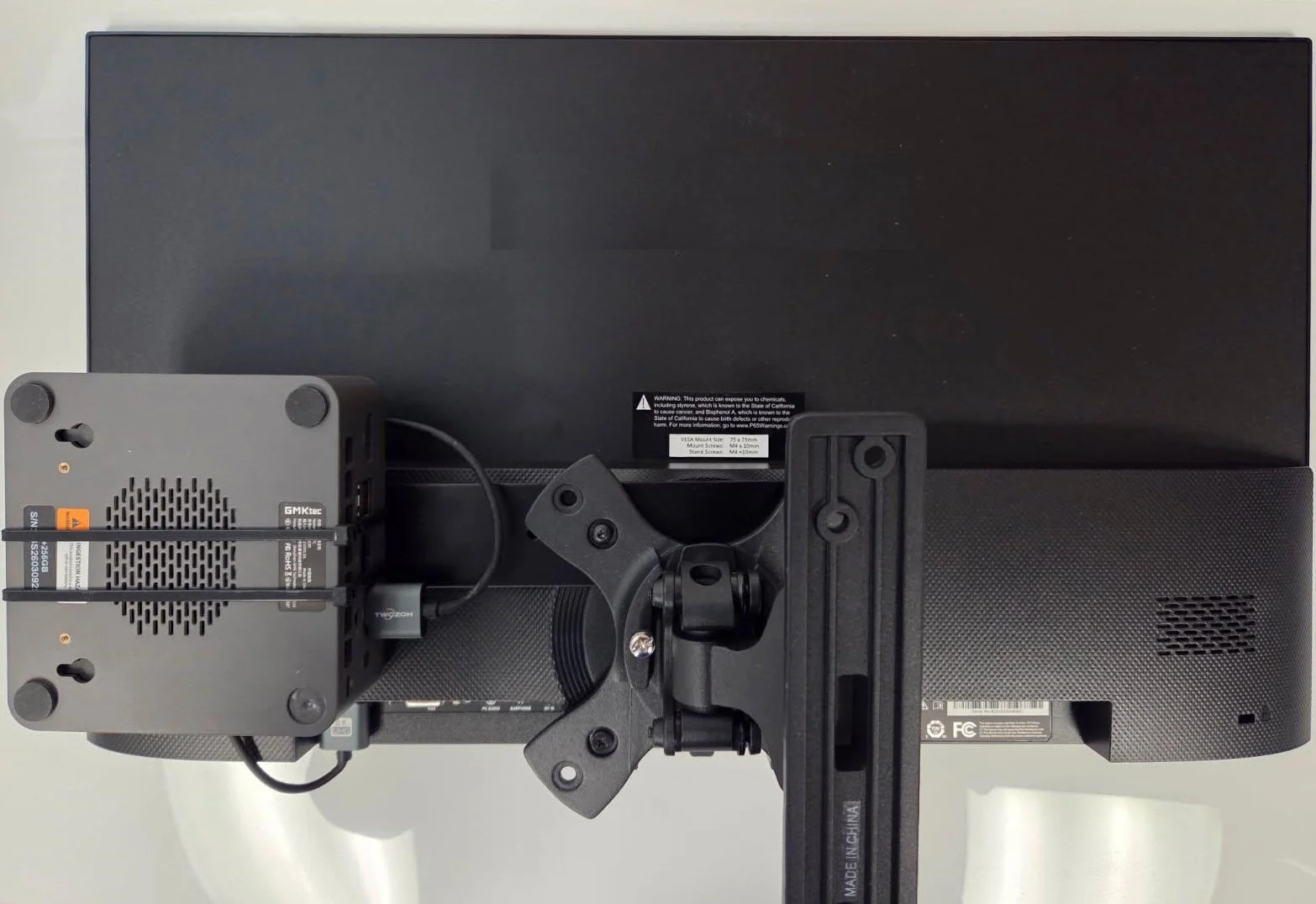
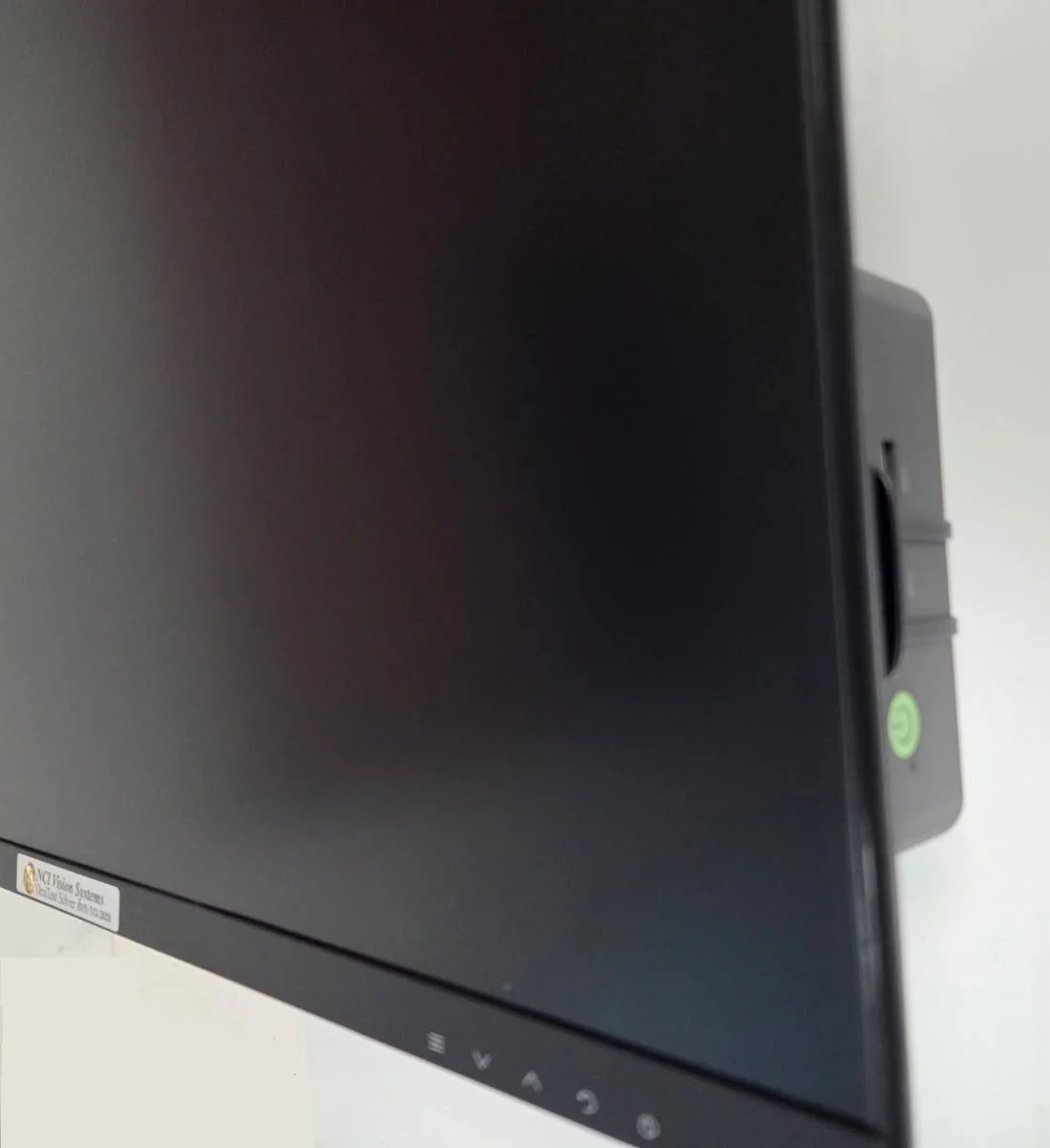
Standard: Our standard configuration is a small, reliable and powerful computer mounted on a custom bracket on the back of a high resolution 22” monitor with a low profile wall mount. The aluminum bracket securely positions the computer at the side of the monitor with the on/off button in a convenient location and provides additional cooling for the computer. While the computer is mounted at the side of the monitor, it is not visible from the front. Mounting hardware, manual, quick start guide, backup software on a flash drive and a mouse (for setup & calibration) are included with every system.

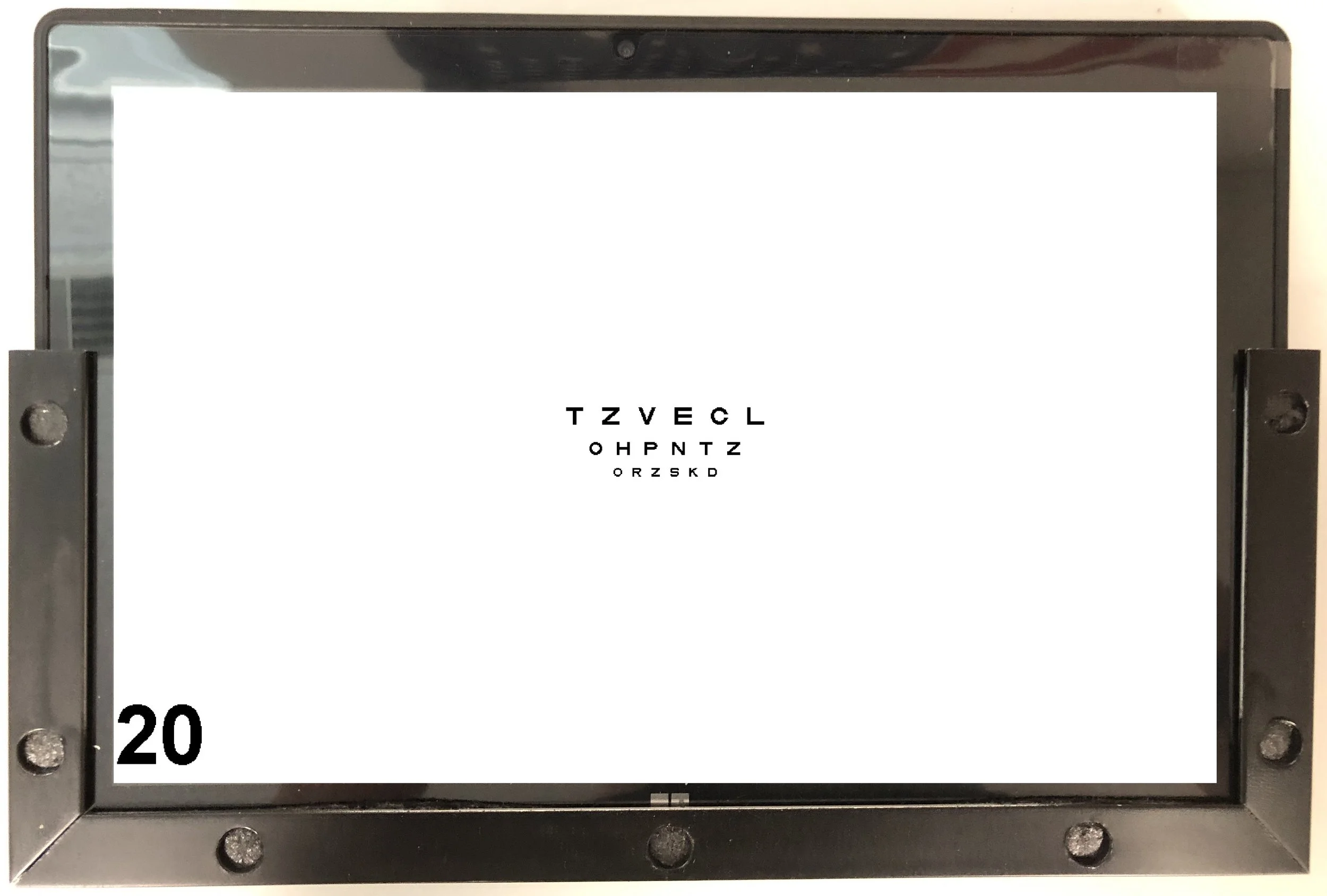
Custom: While we maintain a small inventory of finished “standard” systems in stock, we are happy to provide software to install on an existing computer, dual monitor systems, the computer with Windows configured and software installed on a custom VESA mount bracket to mount on your monitor and, systems with larger or smaller than standard monitors. With NCI’s onsite machine shop, we can easily fabricate brackets, mounts or, a “slide in” wall mount for an 11” tablet.

Small Monitors: Should you consider a smaller monitor?

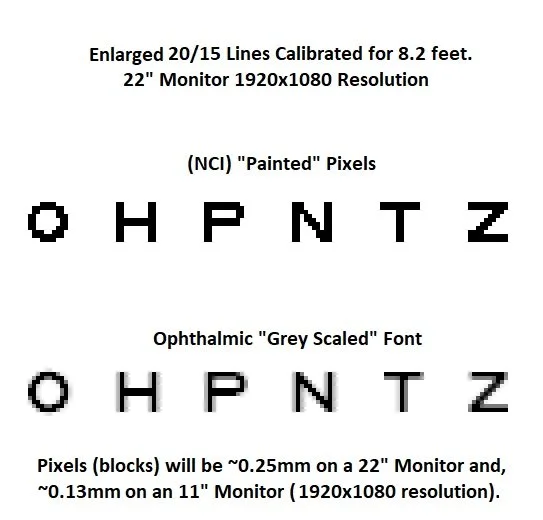
Resolution: The “pixels” that make up all images on a computer screen are actually tiny square blocks. If you greatly enlarge any image on a computer screen, you can see the blocks. On a 22” monitor viewed at 20 feet, these are not visible. If you recalibrate the system to a very short distance, the “blocks” are too large to accurately represent the letter or symbol and also provide a jagged or rough appearance. While nearly all of NCI’s competitors use “grey scaled fonts” to make their images appear “smooth”, NCI “paints” the images using pure black pixels on a white background or pure white pixels on a black background (for low vision assessment). Historically, in the US, the standards required that optotypes be pure black from edge to edge. If you greatly enlarge a small image produced with a font and calibrated to a short distance, in some cases, none of the pixels are pure black. In short, if you use a monitor with smaller pixels, you will get much better quality and accuracy!

Pixel sizes range from about 0.13mm on an 11” monitor with a 1920x1080 resolution to 0.25mm on a 22” monitor with a 1920x1080 resolution. Obviously, an 11” monitor has nearly twice the resolution of a 22” monitor! A good 11” monitor can achieve stunning resolution on 20/10 optotypes at 8 feet, 7 feet and even 6 feet!

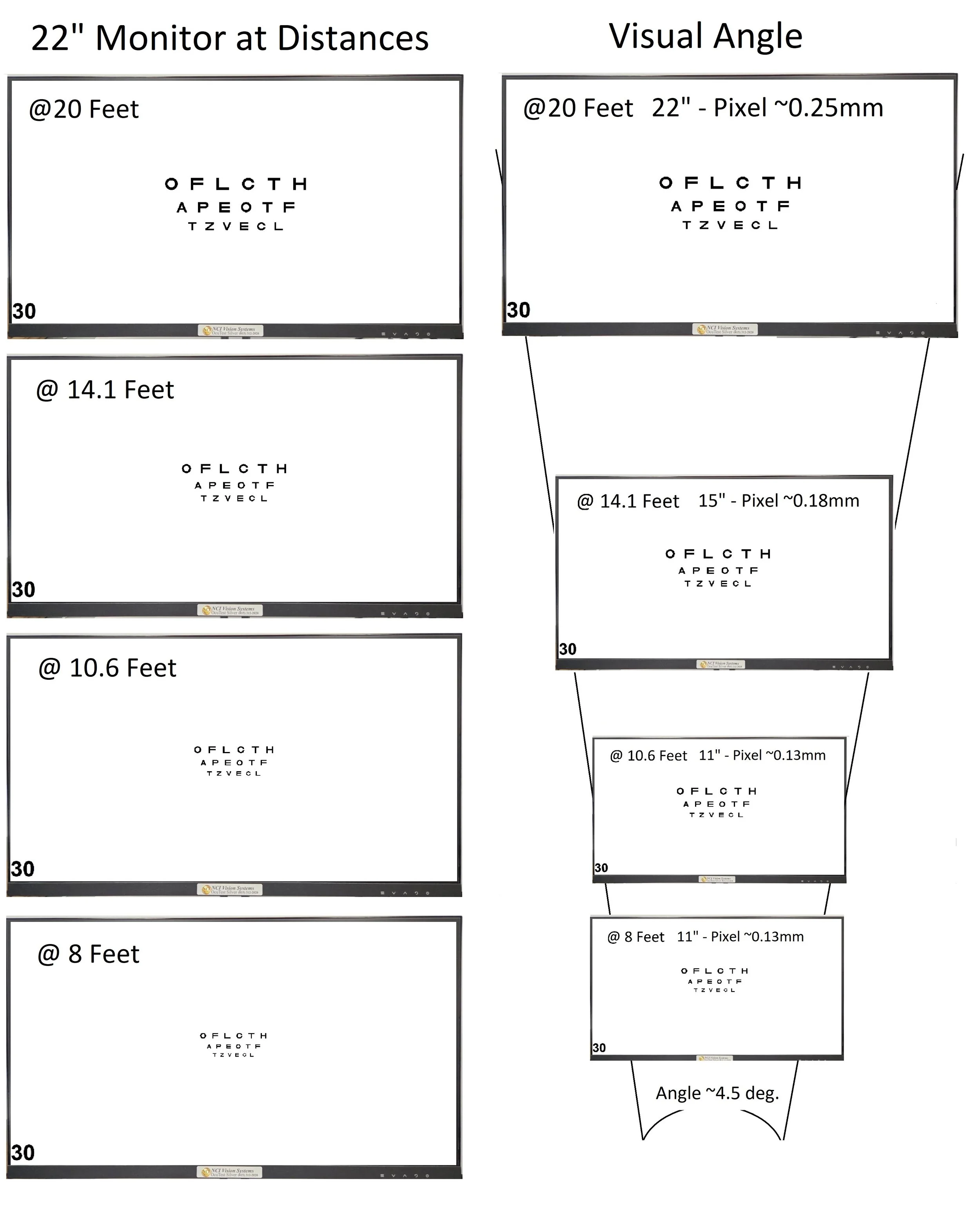
Angle of View: As you can see from the chart, on a 22” monitor at 20 feet, the horizontal width of the screen occupies about 4.5 degrees of the patient’s field of vision. At about 14 feet, a 15 inch monitor appears to be the same size as a 22 inch monitor at 20 feet. Obviously, at 10 feet, an 11 inch monitor will appear to be the same size as a 22 inch monitor at 20 feet but, at 8 feet, the 11 inch monitor actually appears larger than the 22” at 20 feet!

White Space: As you can see from the picture showing a 22 inch monitor calibrated for various distances, what you will get with a large monitor at 8 or 10 feet is a tiny chart in the middle of a large, bright white screen. Aside from looking a bit silly, this introduces a large white background around a tiny chart.

When should you NOT use a smaller monitor?

Mirror: If the space and exam room layout allows the use of a mirror in front of the patient, you might want to consider setting the system to “mirrored” and mounting the system on the back wall.

Low Vision: A 20/800 letter optotype just fits in the vertical space of a typical 22 inch monitor at about 14.8 feet or shorter! If you deal with pediatrics, you’ll need, at least, a 22 inch monitor to display a 20/800 “Allen Symbol” at 10 feet.

Videos: If you frequently use patient education videos, pediatric fixation videos or pictures, your patients will appreciate displaying the videos on a somewhat larger screen.

NOTE: While computer failures are extremely rare with our systems, powerful electrical storms can “fry” any computer. Our computers can be easily replaced in the event of damage without having to ship or take the entire system in for repair. All of our civilian systems are shipped with a backup copy of your software if you need to reinstall or replace/upgrade your systems. Monitors and other components are rarely effected by storms or power surges.
Configurations

Configurations:

Standard: Our standard configuration is a small, reliable and powerful computer mounted on a custom bracket on the back of a high resolution 22” monitor with a low profile wall mount. The aluminum bracket securely positions the computer at the side of the monitor with the on/off button in a convenient location and provides additional cooling for the computer. While the computer is mounted at the side of the monitor, it is not visible from the front. Mounting hardware, manual, quick start guide, backup software on a flash drive and a mouse (for setup & calibration) are included with every system.

Custom: While we maintain a small inventory of finished “standard” systems in stock, we are happy to provide software to install on an existing computer, dual monitor systems, the computer with Windows configured and software installed on a custom VESA mount bracket to mount on your monitor and, systems with larger or smaller than standard monitors. With NCI’s onsite machine shop, we can easily fabricate brackets, mounts or, a “slide in” wall mount for an 11” tablet.

Small Monitors: Should you consider a smaller monitor?

Resolution: The “pixels” that make up all images on a computer screen are actually tiny square blocks. If you greatly enlarge any image on a computer screen, you can see the blocks. On a 22” monitor viewed at 20 feet, these are not visible. If you recalibrate the system to a very short distance, the “blocks” are too large to accurately represent the letter or symbol and also provide a jagged or rough appearance. While nearly all of NCI’s competitors use “grey scaled fonts” to make their images appear “smooth”, NCI “paints” the images using pure black pixels on a white background or pure white pixels on a black background (for low vision assessment). Historically, in the US, the standards required that optotypes be pure black from edge to edge. If you greatly enlarge a small image produced with a font and calibrated to a short distance, in some cases, none of the pixels are pure black. In short, if you use a monitor with smaller pixels, you will get much better quality and accuracy!

Pixel sizes range from about 0.13mm on an 11” monitor with a 1920x1080 resolution to 0.25mm on a 22” monitor with a 1920x1080 resolution. Obviously, an 11” monitor has nearly twice the resolution of a 22” monitor! A good 11” monitor can achieve stunning resolution on 20/10 optotypes at 8 feet, 7 feet and even 6 feet!

Angle of View: As you can see from the chart, on a 22” monitor at 20 feet, the horizontal width of the screen occupies about 4.5 degrees of the patient’s field of vision. At about 14 feet, a 15 inch monitor appears to be the same size as a 22 inch monitor at 20 feet. Obviously, at 10 feet, an 11 inch monitor will appear to be the same size as a 22 inch monitor at 20 feet but, at 8 feet, the 11 inch monitor actually appears larger than the 22” at 20 feet!

White Space: As you can see from the picture showing a 22 inch monitor calibrated for various distances, what you will get with a large monitor at 8 or 10 feet is a tiny chart in the middle of a large, bright white screen. Aside from looking a bit silly, this introduces a large white background around a tiny chart.

When should you NOT use a smaller monitor?

Mirror: If the space and exam room layout allows the use of a mirror in front of the patient, you might want to consider setting the system to “mirrored” and mounting the system on the back wall.

Low Vision: A 20/800 letter optotype just fits in the vertical space of a typical 22 inch monitor at about 14.8 feet or shorter! If you deal with pediatrics, you’ll need, at least, a 22 inch monitor to display a 20/800 “Allen Symbol” at 10 feet.

Videos: If you frequently use patient education videos, pediatric fixation videos or pictures, your patients will appreciate displaying the videos on a somewhat larger screen.

NOTE: While computer failures are extremely rare with our systems, powerful electrical storms can “fry” any computer. Our computers can be easily replaced in the event of damage without having to ship or take the entire system in for repair. All of our civilian systems are shipped with a backup copy of your software if you need to reinstall or replace/upgrade your systems. Monitors and other components are rarely effected by storms or power surges.
NewComputers-Back.jpg
NewComputers-Frt-Angle.jpg
Compare-22in-With-Smaller.jpg
LenovoKpd.png
Tablet11-20at8ft.jpg
20-15-Painted-vs-Font-Optos-8ft.jpg
2-IN-1-Gold.JPG
Summary Block
This block is invalid. Please check the block settings and try again.
Featured
Aenean eu leo Quam
Aenean eu leo Quam

Quisque iaculis facilisis lacinia. Mauris euismod pellentesque tellus sit amet mollis.

Read more →

Powered by Squarespace